Welcome to Millbrook Resort and 28 Settlers Way
Thank you for choosing to stay with us. Each of our Resort Homes and Luxury Retreat properties has been thoughtfully designed to reflect the unique style and preferences of its owner, giving you a one-of-a-kind experience.
This manual includes helpful information about the house and how to use its features during your stay.
We hope you enjoy your time here!
GENERAL
PHONES
The phone is linked to the Millbrook Hotel system.
- The extension for this property is 5028.
- For Reception - dial 0.
- For an outside line – dial 1. Calls will be charged to your account.
- For other internal numbers, such as restaurants and the Spa, please refer to the instructions on the phone, or contact reception to be transferred.
PRIVATE STORAGE
The owner has certain cupboards and/or rooms locked off for private storage.
NOISE LEVELS
Please remember you’re in a residential area - keep noise to a minimum out of respect for neighbouring properties.
ACCIDENTAL DAMAGE OR SPILLS
If anything is accidentally spilt on or damaged during your stay, please let us know as soon as possible. We kindly ask that you do not attempt to clean or repair the issue yourself, as this can sometimes make matters worse. Our team is here to help and will arrange the appropriate response.
Please note that charges may apply depending on the nature and extent of the damage.
RUBBISH & RECYCLING
You’ll find small rubbish bins inside the property - typically located in a drawer to the left of the hob - for everyday use.
Outside, there are larger wheelie bins for rubbish and recycling. Queenstown uses a colour-coded bin system:
- Red lid – General rubbish (non-recyclables)
- Yellow lid – Recycling (clean paper, cardboard, tins, plastics #1, 2 & 5 – no soft plastics or food contamination)
- Blue lid – Glass recycling only (bottles and jars, rinsed and free of lids)
Millbrook encourages guests to recycle wherever possible. If you're unsure where something goes, please don’t worry - just leave it out and our team will ensure it's sorted and disposed of correctly.
Thank you for helping us care for the environment.
HEALTH, FIRE AND SAFETY
EMERGENCY EVACUATION
In the event of an emergency evacuation, please follow the instructions on the emergency evacuation plan located on the Front Door.
Primary Exit: Front Door
Secondary Exit: Living Room Doors
Assembly Point: Grassed area beside the house – Please ensure you are at a safe distance.
FIRST AID
If you accidentally injure yourself or someone in your group requires basic medical supplies, please contact or visit Reception. A first aid kit is available, and our staff will be happy to assist you.
For more serious injuries or medical emergencies, please call 111 immediately for emergency services, and notify Reception as soon as it is safe to do so.
Your safety and well-being are important to us—don’t hesitate to reach out if you need assistance.
FIRE EXTINGUISHER
A small fire extinguisher can be found under the kitchen sink.
- Pull the pin on the extinguisher.
- Aim the nozzle toward the base of the fire.
- Squeeze the handle to release the extinguisher agent.
- Sweep from side to side until the flames are extinguished.
If the extinguisher is emptied and the fire is still not out, evacuate the property immediately and dial 111 for emergency services and notify Reception as soon as it is safe to do so.
FIRE BLANKET
A fire blanket can be found in the Master Bedroom Wardrobe.
Fire blankets are designed to smother small fires, such as those on stovetops or clothing. Only use a fire blanket if it is safe to do so.
To use:
- Pull down sharply on the tabs to release the blanket from its container.
- Hold the blanket up in front of you to shield your hands and body.
- Gently place the blanket over the fire to smother it—do not throw it.
- Turn off the heat source (e.g. stove) if it is safe to do so.
- Leave the blanket in place until the fire is completely out and the area has cooled.
If a person’s clothing is on fire, wrap the blanket around them to smother the flames and get medical help immediately.
Important:
If the fire is too large or spreading, evacuate the property immediately and call 111.
HEATING
WALL HEATERS (DINING AND BEDROOMS)
- Ensure the heater is switched on at the wall and on the side of the heater.
- Press
 the POWER button on the bottom right side of the screen and use the + and – symbols to adjust the temperature. If the heater is already on, press anywhere on the screen beneath the temperature for the display to illuminate.
- The heater’s thermostat is set so that if the target temperature is reached, the heater will run in standby mode and when the temperature drops, it will automatically increase to the target temperature again.
- Please do not adjust any other settings other than pressing + or – to adjust the temperature, or it may interfere with the efficiency of the heater.
- The heater will automatically lock after 3 minutes of normal operation and the
 symbol will appear. To unlock it, press the – button.
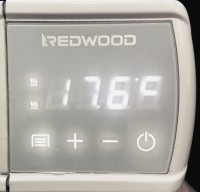
IMPORTANT: Please do not place anything up against these heaters or use them as drying appliances.
WALL HEATER (LOUNGE & UPSTAIRS HALLWAY)
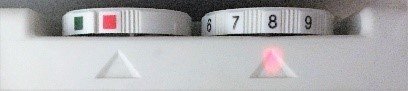
To switch on, turn the dial so the red square, which is above the left △ and turn the dial on the right so the desired heating temperature also sits above the △.
GAS FIREPLACE (LOUNGE)
- To turn the fireplace on, press the POWER button, located at the bottom right of the fireplace.
- To turn back off, press the POWER button again.
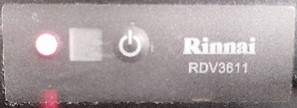
IMPORTANT: The glass gets very hot. Never place items close to or up against the fireplace. If there is no fireguard, one can be requested from Reception to be delivered to the property. Always switch off the fireplace when the property is vacant.
GAS FIREPLACE (MEDIA ROOM)
The fireplace in the media room is not available for guest use. Please respect the signage in place.
VENTILATION SYSTEM (LIVING ROOM)
The ventilation system brings in fresh air and removes stale air, helping keep the home dry, clean, and comfortable—warming the air in winter and cooling it in summer.
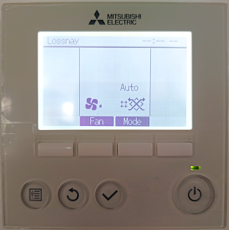
- To turn on/off, press the POWER button.
- To increase or decrease the fan, press the white rectangular button beneath FAN.
NOTE: Please leave the ‘mode’ setting on Auto. Also shown in the picture below:
AIR CONDITIONING/HEAT PUMP (UPSTAIRS)
There is an air-conditioning system in place for the upstairs bedrooms.
- To turn on/off, press the POWER button.
- To increase or decrease the fan speed, press the white rectangular button beneath FAN.
- To change between modes (Cooling / Fan / Auto etc) press the white rectangular button beneath MODE.
- To increase or decrease the set temperature, press the white rectangle buttons beneath TEMP + and -
KITCHEN
GAS HOB
To use the gas hob:
- The cooking rings are indicated by the black circle in the square next to each dial.
- To turn the gas ring on, push down on the dial while turning it to the left until the flames appear.
- Adjust the level of the flame by turning the dial further to the left.
Always ensure the gas is switched off after use.
OVEN
Oven Controls
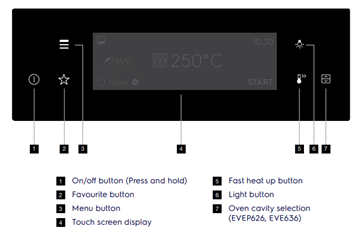
Touch Screen Display Controls
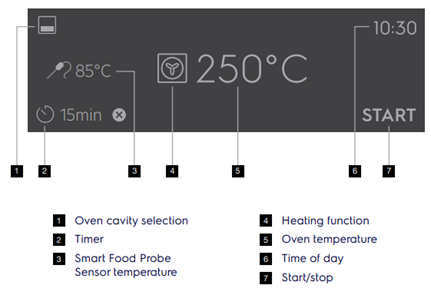
For the Main (Upper) Oven:
- Turn on the oven: Press and hold the ON/OFF button until it beeps.
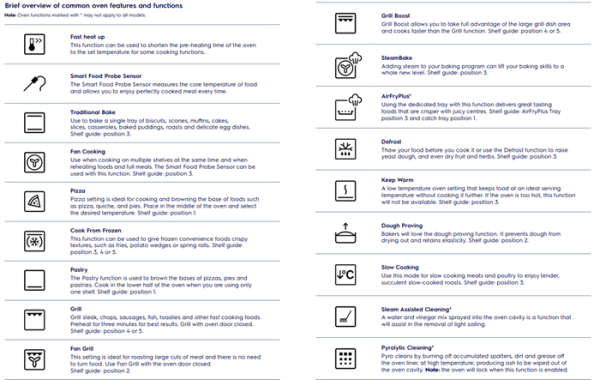
- Choose a cooking function: Tap the Heating Function symbol on the touch screen.
- Set the temperature: Tap the temperature on the screen, scroll left or right to choose your desired temperature, then press OK.
- Start cooking: Press START on the screen.
- To stop at any time: Press STOP.
- Turn off the oven: Press the ON/OFF button again when finished.
For the Lower Oven:
- Select the lower oven: Press the Oven Cavity button until the lower oven is selected.
- Choose function & temperature: Repeat the same steps as above.
- Start cooking: Press START.
- To stop at any time: Press STOP.
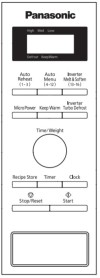
MICROWAVE
For Quick Heating:
- Turn the dial clockwise to set the cooking time (starts from 10 seconds).
- Press START to begin.
To Defrost Food:
- Turn the dial to set the weight of the food.
- Press INVERTER TURBO DEFROST to start.
- The microwave may beep during defrosting—this means it's time to turn, break apart, or remove the food as needed.
EXTRACTOR FAN
Underneath the extractor fan you will find a panel of buttons. Use 1, 2 or 3 to turn the extractor fan on (depending on the intensity you require). To light the hob area, switch on the flashing button (far left). Turn off the extractor fan by pressing the 0 button.
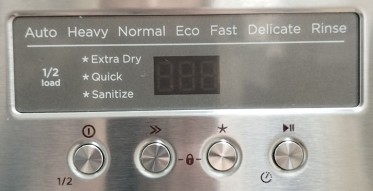
DISHWASHER
- The dishwasher tablets are located in the cupboard under the sink. Load your dishwasher and place a tablet in the tablet tray on the inside of the door.
- Press
 to turn the dishwasher on. The display will flash.
- Press ≫ to select your preferred wash cycle.
- Press START/PAUSE to begin the cycle.
LAUNDRY
For your convenience, the property is equipped with a washing machine and a dryer, as well as an iron and ironing board.
WASHING MACHINE
For quick use:
- Turn the dial to select your preferred wash setting.
- Press the START/PAUSE button to begin the washing process.
TUMBLE DRYER
For quick use:
- The dryer will start automatically when the dial is turned. Always turn the dial in a clockwise direction (to the right), do not turn it to the left or it can damage the turning mechanism.
- The numbers indicate the amount of drying time in minutes.
- Please remove lint from the filter after each drying cycle.
HOME ENTERTAINMENT
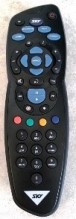
TV (MASTER BEDROOM)
Sky TV Only.
- To turn on the TV, press the POWER button.
- To change the channels, use the numeric pad, or the UP or DOWN channel button.
- To change volume, press the VOL button UP or DOWN.
TV (UPSTAIRS GUEST BEDROOM)
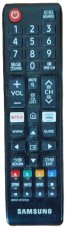
Freeview & Apps Only.
Turn on the TV: Press the POWER button on the remote.
Watch Freeview:
– From the Home Screen, select FREEVIEW.
– Use the number keypad to enter a channel or use CH ▲ / ▼ to scroll.
Return to Home Screen: Press the HOME button.
Watch Streaming Apps:
– Scroll through and select an app.
– Log in with your own account.
– IMPORTANT: Please log out after use. Millbrook is not responsible for other guests accessing your accounts.
TV (LOUNGE)
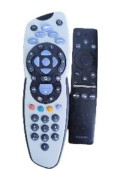
Turn On the TV: Use the SAMSUNG remote and press the POWER button.
Watch Sky Channels
– Use the SKY remote to enter a channel number with the keypad,
or use CH ▲ / ▼ to scroll through channels.
Adjust the Volume
– Use the VOL button on the SAMSUNG remote to turn the volume up or down.
Watch Streaming Apps
-
- Press the HOME button on the SAMSUNG remote.
- Scroll through the apps using the arrow (circular) buttons, and select your app.
- Log in with your personal account.
- IMPORTANT: Please log out after use. Millbrook is not responsible for other guests accessing your streaming accounts.
TV (MEDIA ROOM)
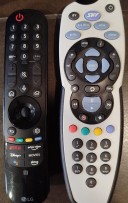
Turn on the TV – Press the POWER button on the LG remote.
Navigate to Home Screen
– Press the HOME button to open the main menu.
– Use the arrow keys (▲▼◄►) on the remote to move through apps and options.
– Press OK/Enter (center button) to select.
Watch SKY TV
– From the Home screen, select Sky TV
– Use the SKY TV remote to change channels
IMPORTANT:
The Sky box is hidden and uses an infrared cable beneath the TV.
Due to the angle, the Sky remote signal may not always register immediately. This is normal — please aim the remote directly at the lower edge of the TV and try a few times if needed.
Watch Streaming Apps
- Press HOME on the LG remote.
- Scroll and select your preferred app (e.g. Netflix, YouTube).
- Log in with your own account.
- IMPORTANT: Please log out after use. Millbrook is not responsible for others accessing your accounts.
Adjust the Volume
– Use the VOL + / − buttons on the LG remote.
OUTDOORS
GAS FIREPLACE
- Remove the cover before turning on.
- The switch to turn the fireplace on/off is located on the right handside of the fireplace.
- Switch off after use and place the cover back on.
IMPORTANT: The wood beside the fireplace is for display purposes only. DO NOT put any logs on the fire.
OUTDOOR HEATER
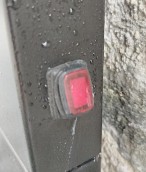
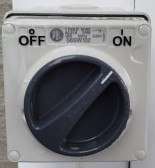
- The switch is located on the post beside the BBQ.
- To turn on, turn the dial from OFF to ON.
IMPORTANT: Please switch it off after use.
LOUVRES
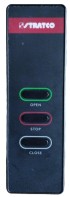
- The remote for the louvres is located behind the right-hand side curtain of the doors.
- Press the buttons to OPEN / STOP / CLOSE the louvres
DUCKS
We kindly ask guests NOT to encourage the ducks onto the property by feeding them, as they will leave a mess on the patio and inside the house.
FURTHER INFORMATION
Should you require further assistance during your stay here at Millbrook, please contact Reception on ext 0.
Once again, we hope you enjoy your stay.