Welcome to Millbrook Resort and 2 Owen Marshall Lane
For your convenience please find below the Property Manual for your Resort Home and important guest information on the House Rules.
We hope that you have a wonderful stay with us.
Important Guest Information, House Rules
The Resort Homes are private residences managed by Millbrook Resort, we kindly ask that all guests staying within this accommodation type respects our property owners by complying with the following requests:
-
Please remove any soiled footwear before entering the property.
-
Any spillages on soft furnishings should be reported to Reception so our housekeeping team can attend to them promptly. To avoid further damage, please do not attempt to remove stains on upholstery.
-
Most wall heating thermostats have been pre-programmed (basic instructions for increasing/decreasing heat are in the online Property Manual). If you are unsure how to adjust the settings, please contact Reception so a staff member can assist you.
Thank you and we hope that you have an enjoyable stay.
2 Owen Marshall lane Property Manual
All of our Resort Homes and Luxury Retreat properties have been specifically tailored and designed to the requirements of each individual owner, making your stay a unique experience. Within this manual we have included some information specific to this property, relating to the operation of various components found within the house. We would like to remind you that this is a residential area with neighbouring properties and we ask that noise levels are kept to a minimum. Should any accidental damage occur, please inform a member of staff immediately to avoid any additional charges being incurred. Thank you for your care and consideration.
PHONES
Millbrook’s Hotel system is linked to the phone/s in this property.
- The extension for this property is 5792
- For Reception - dial 0
- For an outside line – dial 1. Calls will be charged to your account
- For other internal numbers, such as restaurants and the Spa, please refer to the instructions on the phone, or the Millbrook compendium here.
PRIVATE STORAGE
The owner has various locked cupboards and rooms around the property for private storage.
RUBBISH
There is a waste disposal unit located in your kitchen sink where you can dispose of soft food scraps and vegetable peel. Place the items you want to dispose of down the drain, turn on the cold water tap so water is running down the drain and press the button located behind the sink to start the grinding. Press the button again to stop the machine. Please do not place chicken, fish or meat bones, banana skins (or any fibrous or hard foods) in the unit.
There are rubbish bins located in the drawer to the far left of the kitchen sink. Outside of the property there is a GENERAL WASTE rubbish bin (red lid) which are collected on a Monday and a GLASS BOTTLE rubbish bin (blue lid) which are collected on a Friday. Please rinse all bottles and remove any lids before disposing of them to avoid contamination.
FIRE EXTINGUISHER
A small fire extinguisher can be found under the kitchen sink.
- Pull the pin on the extinguisher.
- Aim the nozzle toward the base of the fire.
- Squeeze the handle to release the extinguisher agent.
- Sweep from side to side until the flames are extinguished.
If the extinguisher is emptied and the fire is still not out, evacuate the property immediately.
SMOKE ALARM
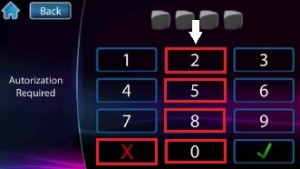
If the smoke alarm (panel located next to the front door) has gone off for minor incidents such as burning toast, it can be disarmed by pressing the numbers on the keypad: 2, 5, 8, 0 then X. DO NOT disarm the alarm if a fire occurs. If the fire cannot be contained using the fire extinguisher, get out of the property immediately and call 111.
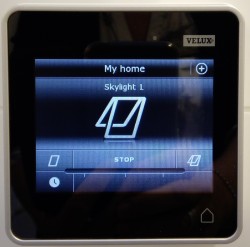
Skylight Windows
Skylight windows in the two bathrooms can be opened or closed by using the touch-screen in those rooms. Simply touch the HOUSE icon on the bottom right of the screen to display the controls. To open the window, touch the icon on the right-hand side and close the window by touching the icon on the left-hand side. You can stop the window before it reaches it minimum or maximum level by touching STOP.
HEATING & COOLING
WALL RADIATORS
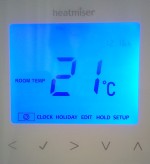
Heat from wall radiators in various rooms can be controlled by turning the dial on the side of each one. The main thermostat panel for the wall radiators is located on the wall in the hallway between the two guest bedrooms. It is set to a specific comfort level and once reached; the raditators will no longer heat up. However if you wish to change the temperature:
- Ensure the POWER button is selected with a square around it. If one of the other settings has the square around it, e.g. Edit, or Setup, then press the ARROW keys < > to move through the selections until it sits on POWER.
- Then press the ARROW ∧ v symbols to adjust the temperature up or down.

IMPORTANT: Please do not place anything up against heaters or use them as drying appliances.
BATHROOM UNDERFLOOR HEATING
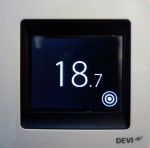
Heating is controlled separately in each bathroom. The controls should not need adjusting, however you can change the temperature by selecting the circles and then adjusting the temperature using the arrow keys.
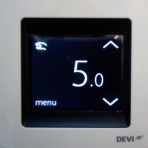
There are also heated towel rails in each bathroom, controlled by the switch labelled HEAT.
HEAT PUMPS
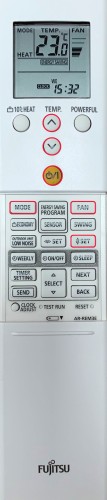
There are two heat pumps located in the master bedroom and dining area and the remotes can be found on the wall near each one. These heat pumps can also be used for air-conditioning in warmer months but all windows and doors should be closed for the unit to be effective.
- Press the yellow POWER button to turn the heat pump on.
- Use the keys to change the temperatures.
- Press the FAN key to adjust the force of the air flow.
- Press the two SET buttons to adjust the position of the air flow.
- Press POWER again to turn the heat pump off.
GAS FIREPLACE
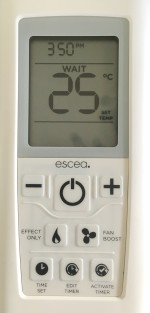
The fireplace is controlled by a remote which can be found on the wall above the radiator in the TV area.
- Push the POWER button in the centre of the remote and wait for approximately 35-40 seconds for the fire to ignite.
- Use the – and + buttons to control the temperature.
- Turn off the fire by pushing the POWER button again.
IMPORTANT: The glass gets very hot. Never place items close to or up against the fireplace. If you have young children in your group, a fireguard can be requested from Reception to be delivered to the property. Always switch off the fireplace when the property is vacant.
KITCHEN
The kitchen is equipped with the following appliances for your convenience:
INDUCTION HOB
Please only use the pots and pans provided in this kitchen, to avoid damage to the glass hob surface.
EXTRACTOR FAN
Underneath the extractor fan you will find a panel of buttons. Use 1, 2 or 3 to turn the extractor fan on (depending on the intensity you require). For light, press the button showing a light bulb (far left). Turn off the extractor fan by pressing the ‘0’ button.

OVEN
The oven programme you require is set using the FUNCTION dial. You can then set the temperature you require with the TEMPERATURE dial, which differs slightly with each setting.
MICROWAVE
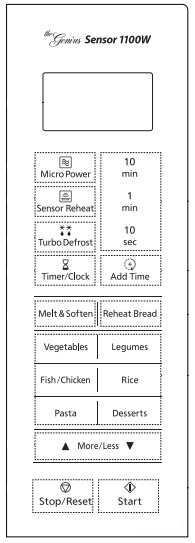
- Push the amount of time you require from the panel on the right e.g. for 25minutes push ’10 min’ twice, then ‘1 min’ five times.
- Press the START button.
- When finished cooking, push the STOP/RESET button.
DISHWASHER
There are two separate dish drawers either side of the kitchen sink.
- Press the
 button.
- Load your dishes into the dish drawer.
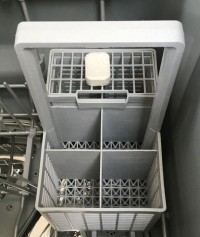
- Place a dishwashing tablet on the top of the cutlery tray (see image below). Tablets are located under the kitchen sink.
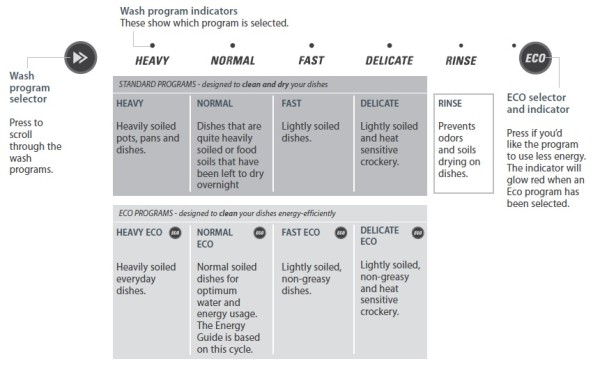
- Select one of the programme options in the image below by pushing the
 button.
- Close the drawer and press the
 button on the front of the drawer.
LAUNDRY
For your convenience, the property is equipped with both a washing machine and a dryer, as well as an iron, ironing board and vacuum cleaner.
WASHING MACHINE
The detergent tray is on the top left of the washer. Place laundry detergent in the compartment labelled II and fabric softener in the middle tray. Do not use fabric softener if you require the QUICK programme.
To start the wash, press the POWER button and use the large dial to select the programme you require. Press START/PAUSE to begin the wash. If you need to pause the wash at any time, press START/PAUSE again. You can also select a new cycle once the wash is paused, if you require.

TUMBLE DRYER
- Check the linter filter is clean and the water tank is empty before every load.
- Press the
 button to activate the dryer.
- The dryer will default to ‘Everyday’ cycle. Select your desired cycle by turning the SmartTouchTM Control Dial.
- Select your preferred drying options using the SmartTouchTM buttons on the right-hand side of the panel (if you wish to select options different from the default options for the cycle).
- Touch the
 button to start the cycle.

ENTERTAINMENT
TV (LOUNGE & MASTER BEDROOM)
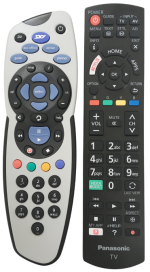
The remotes can be found on the coffee table in the lounge and the bedside table in the master bedroom. To turn on the TV, press the POWER button on the PANASONIC remote control. To adjust the TV channels and volume use the SKY remote control. To turn off the TV, press the POWER button on the PANASONIC remote again. Please do not use the SKY remote to turn off the TV.
BLUETOOTH SPEAKER (SUNROOM)
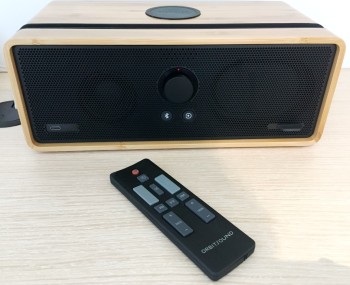
This speaker allows you to charge and listen to music on your device:
- To charge, simply place your device on to disc on the top of the speaker (you will hear a beep when it has connected). The charger is only compatible with devices that have QI capabilities. If not compatible, you can plug your device into the charging port on the bottom left of the unit using your own charging cable.
- The slot on top of the speaker allows you to place various-sized devices within it.
- Press the
 button to allow Bluetooth capabilities, and the
  button for other auxiliary products.
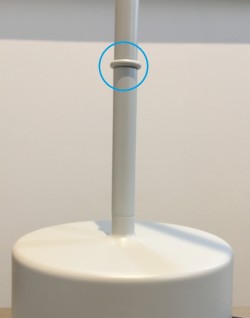
GUEST BEDROOM LAMPS
Using your finger, tap the area highlighted in the image to turn on the light. Keep tapping this area to vary the level of light and to subsequently turn it off.
OUTDOORS
BBQ
To light a burner, press down and turn the dial toward the star. Hold down until you hear the flame ignite. Then turn the dial counter-clockwise to the desired heat level. Turn the dial back to O to turn the burner off.
IMPORTANT: For safety, always turn off gas appliances after use.
PATIO CEILING HEAT
The switch for the patio ceiling heat is located on the wall to the right side of the sliding doors. Push Heat, then push Press, which will turn on the timer for a maximum of 2 hours only. For a longer duration, keep repeating this process.
DUCKS
We kindly ask guests NOT to encourage the ducks onto the property by feeding them, as they will leave a mess on the patio and inside the house.
FURTHER INFORMATION
Should you require further assistance during your stay here at Millbrook, please contact Reception on ext 0.
Once again, we hope you enjoy your stay.