Welcome to Millbrook Resort and 5 The Mews
For your convenience please find below the Property Manual for your Resort Home and important guest information on the House Rules.
We hope that you have a wonderful stay with us.
Important Guest Information, House Rules
The Resort Homes are private residences managed by Millbrook Resort, we kindly ask that all guests staying within this accommodation type respects our property owners by complying with the following requests:
-
Please remove any soiled footwear before entering the property.
-
Any spillages on soft furnishings should be reported to Reception so our housekeeping team can attend to them promptly. To avoid further damage, please do not attempt to remove stains on upholstery.
-
Most wall heating thermostats have been pre-programmed (basic instructions for increasing/decreasing heat are in the online Property Manual). If you are unsure how to adjust the settings, please contact Reception so a staff member can assist you.
Thank you and we hope that you have an enjoyable stay.
5 The Mews Property Manual
All of our Resort Homes and Luxury Retreat properties have been specifically tailored and designed to the requirements of each individual owner, making your stay a unique experience. Within this manual we have included some information specific to this property, relating to the operation of various components found within the house. We would like to remind you that this is a residential area with neighbouring properties and we ask that noise levels are kept to a minimum. Should any accidental damage occur, please inform a member of staff immediately to avoid any additional charges being incurred. Thank you for your care and consideration.
PHONES
Millbrook's Hotel system is linked to the phone/s in this property.
- The extension for this property is 5105
- For Reception - dial 0
- For an outside line – dial 1. Calls will be charged to your account.
- For other internal numbers, such as restaurants and The Spa, please refer to the instructions on the phone, or the Millbrook Compendium here.
PRIVATE STORAGE
The owner has various cupboards and/or rooms around the property locked for private storage.
RUBBISH
There is a waste disposal unit located in your kitchen sink where you can dispose of soft food scraps and vegetable peel. Place the items you want to dispose of down the drain, turn on the cold water tap so water is running and press the button located on the wall to the right of the sink to start the grinding. Press the button again to stop the machine. Please do not place chicken, fish or meat bones, banana skins (or any fibrous or hard foods) in the unit.
There is a rubbish bin located in the kitchen. Outside of the property there is a GENERAL WASTE rubbish bin (red lid) which are collected on a Monday and a GLASS BOTTLE rubbish bin (blue lid) which are collected on a Friday. Please rinse all bottles and remove any lids before disposing of them to avoid contamination.
FIRE EXTINGUISHER
A small fire extinguisher can be found under the kitchen sink.
- Pull the pin on the extinguisher.
- Aim the nozzle toward the base of the fire.
- Squeeze the handle to release the extinguisher agent.
- Sweep from side to side until the flames are extinguished.
If the extinguisher is emptied and the fire is still not out, evacuate the property immediately.
HEATING
WALL HEATERS (BEDROOMS & FOYER)
- Ensure the heater is switched on at the wall and also on the side of the heater.
- Press the POWER button on the bottom right side of the screen and use the + and – symbols to adjust the temperature. If the heater is already on, press anywhere on the screen beneath the temperature for the display to illuminate.
- The heater’s thermostat is set so that if the target temperature is reached, the heater will run in standby mode and when the temperature drops, it will automatically increase to the target temperature again.
- Please do not adjust any other settings other than pressing + or – to adjust the temperature, or it may interfere with the efficiency of the heater.
- If the heater locks (which it does automatically after 3 minutes of normal operation) and the lock light is illuminated, simply press and hold the – button to unlock it again.
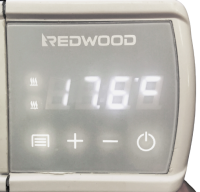
IMPORTANT: Please do not place anything up against heaters or use them as drying appliances.
UNDER-FLOOR HEATING (MASTER BATHROOM)
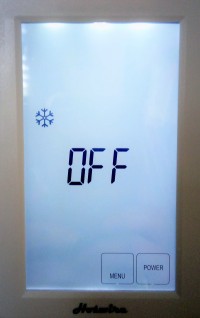
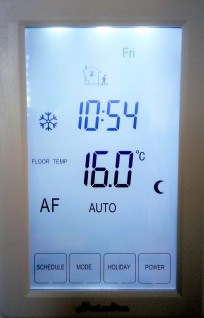
The control panels (behind the bathroom door) is pre-programmed to a specific heat setting. However, the heating can be adjusted as follows:
- Press the POWER button on the bottom right corner.
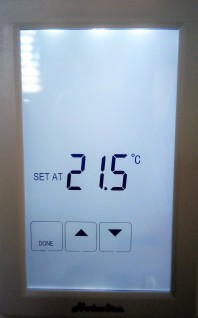
- To adjust the temperature, push the number on the temperature reading.
- Use the arrows to adjust, then push DONE on the left.
GAS FIREPLACE (LOUNGE)
The fireplace is controlled by the grey remote which is located on the coffee table.
- Turn on the switch for the unit (on the wall to the right side of the fireplace).
- Aim the remote control at the fireplace (stand back far enough for the remote signal to be received by the sensor on the fireplace) and press the OK and POWER button simultaneously. If the remote doesn’t turn it on, you can push the manual button on the bottom right of the fireplace.
- Once the fire has ignited, control the size of the flame by using the UP and DOWN.
- If the temperature exceeds 40°C, the heater will automatically shut down for safety reason.
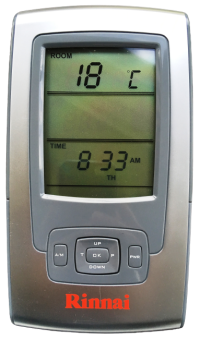
IMPORTANT: The glass gets very hot. Never place items close to or up against the fireplace. If you have young children in your group, a fireguard can be requested from Reception to be delivered to the property. Always switch off the fireplace when the property is vacant.
KITCHEN
The kitchen is equipped with the following appliances for your convenience:
INDUCTION HOB
IMPORTANT INFORMATION:
- Do not use any other cooking pot or pan on this hob other than those provided in this kitchen or supplied by Millbrook’s Food & Beverage Department.
- Only use water and a soft cloth to clean the hob. Please let Housekeeping staff know if you can’t remove cooking residue.
- Do not allow pots or pans to boil dry as this can damage the hob surface.
- It is normal to hear electrical/clicking noises emanating from the hob when cooking.
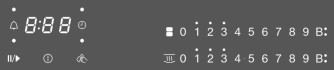
- Touch the
 sensor. If no further entry is made, the cooktop will switch itself off after a few seconds for safety reasons.
- Place the pot/pan on one of the four cooking zones you want to use.
- Touch one of the four 0 sensors depending on which cooking zone you choose to use. The numeric keypad will illuminate and you can then select the desire level of power from 1-9. The extractor fan will start automatically but if you want to adjust the setting (see EXTRACTOR FAN information below).
- Each cooking zone is equipped with a TwinBooster (B:). When activated, the power is boosted so that large quantities can be heated up quickly, e.g. when boiling pasta. The boost in power is active for a maximum of 15 minutes. To turn the booster on and off touch the B sensor.
- To switch off a cooking zone, touch the 0 sensor for that cooking zone.
- To switch off the cooktop and all the cooking zones touch the sensor.
EXTRACTOR FAN
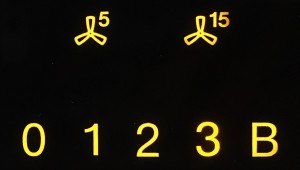
The extractor fan will switch itself on automatically if there is a pan on a cooking zone and a power level has been set for that zone. The power level on the extractor is set to suit the power level on the cooktop.
- The power level of the extractor can be manually altered at any time. For light to heavy cooking vapours, select from power levels 1-3. For short periods of strong vapours and cooking odours, e.g. whilst searing meat, select the B booster sensor.
- To switch the fan on and set a power level, touch the appropriate sensor for the power level you want.
- To switch the fan off, touch the 0 If the extractor is not switched off, it will switch itself off automatically 12 hours after the last sensor is touched.
- It is advisable to run the fan for a few minutes after cooking has finished. This helps neutralise any lingering vapours/odours in the air. Touch either the 5 (5-minute) or 15 (15-minute) sensors to activate the run-on time. If you switch the cooktop off, you the run-on period will continue through to the end.
OVEN
- Use the FUNCTION dial to choose the cooking programme you require.
- Then set the temperature for the cooking programme using the TEMPERATURE dial (this will differ slightly with each cooking setting).
- When finished cooking, turn the FUNCTION dial to the OFF position.
MICROWAVE
For quick use:
Press the desired time in 1-second, 10-second, 1-minute and 10-minute increments. Then press START.
DISHWASHER
The dishwasher tablets are located in the cupboard under the sink.
- Turn on the dishwasher using the POWER button.
- Load your dishes into the dish drawer.
- Place your dishwashing tablet in the tablet tray and close the door.
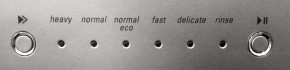
- Press the arrow button on the left of the display panel until you get the desired dishwashing setting.
- Press the arrow button on the far right to begin the wash cycle (this button will also pause the cycle if needed).
LAUNDRY
For your convenience, the property is equipped with a washing machine and a dryer, as well as an iron and ironing board.
WASHING MACHINE
For quick use:
- Place your clothes in the washing machine, remove the Fabric Softener dispenser cup, place the laundry powder into the agitator cylinder and replace the cup.
- Press the POWER button to turn on the machine.
- Select the double arrow button to scroll through the length of the wash cycle you require.
- You can select SMART CYCLES depending on your requirements and also adjust WASH TEMPERATURE, WATER LEVEL and SPIN SPEED.
- Press START/PAUSE to begin the cycle.
TUMBLE DRYER
For quick use:
- Turn the dryer on with the POWER button and place clothes in the tumbler.
- Select the DRYNESS you require.
- Press START/PAUSE to begin the cycle.
- Please remove lint from the filter after each use.
HOME ENTERTAINMENT
TV (LOUNGE & MASTER BEDROOM)
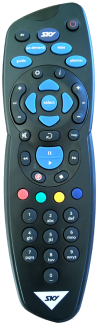
- To turn on the TV, press the red POWER button on the SKY remote control and use this same remote to adjust the volume and change the TV channels.
- To turn off the TV, press the red POWER button again.
OUTDOORS
DUCKS
We kindly ask guests NOT to encourage the ducks onto the property by feeding them, as they will leave a mess on the patio and inside the house.
FURTHER INFORMATION
Should you require further assistance during your stay here at Millbrook, please contact Reception on ext 0. Once again, we hope you enjoy your stay.