Welcome to Millbrook Resort and 22 Ayrburn Ridge
Thank you for choosing to stay with us. Each of our Resort Homes and Luxury Retreat properties has been thoughtfully designed to reflect the unique style and preferences of its owner, giving you a one-of-a-kind experience.
This manual includes helpful information about the house and how to use its features during your stay.
We hope you enjoy your time here!
GENERAL
PHONES
The phone is linked to the Millbrook Hotel system.
- The extension for this property is 5622.
- For Reception - dial 0.
- For an outside line – dial 1. Calls will be charged to your account.
- For other internal numbers, such as restaurants and the Spa, please refer to the instructions on the phone, or contact reception to be transferred.
PRIVATE STORAGE
The owner has certain cupboards and/or rooms locked off for private storage.
NOISE LEVELS
Please remember you’re in a residential area - keep noise to a minimum out of respect for neighbouring properties.
ACCIDENTAL DAMAGE OR SPILLS
If anything is accidentally spilt on or damaged during your stay, please let us know as soon as possible. We kindly ask that you do not attempt to clean or repair the issue yourself, as this can sometimes make matters worse. Our team is here to help and will arrange the appropriate response.
Please note that charges may apply depending on the nature and extent of the damage.
RUBBISH & RECYCLING
You’ll find small rubbish bins inside the property - typically located in a drawer to the left of the hob - for everyday use.
Outside, there are larger wheelie bins for rubbish and recycling. Queenstown uses a colour-coded bin system:
- Red lid – General rubbish (non-recyclables)
- Yellow lid – Recycling (clean paper, cardboard, tins, plastics #1, 2 & 5 – no soft plastics or food contamination)
- Blue lid – Glass recycling only (bottles and jars, rinsed and free of lids)
Millbrook encourages guests to recycle wherever possible. If you're unsure where something goes, please don’t worry - just leave it out and our team will ensure it's sorted and disposed of correctly.
Thank you for helping us care for the environment.
HEALTH, FIRE AND SAFETY
EMERGENCY EVACUATION
In the event of an emergency evacuation, please follow the instructions on the emergency evacuation plan located on the Front Door.
Primary Exit: Front Door
Secondary Exit: Living Room Doors
Assembly Point: Grassed area beside the house – Please ensure you are at a safe distance.
FIRST AID
If you accidentally injure yourself or someone in your group requires basic medical supplies, please contact or visit Reception. A first aid kit is available, and our staff will be happy to assist you.
For more serious injuries or medical emergencies, please call 111 immediately for emergency services, and notify Reception as soon as it is safe to do so.
Your safety and well-being are important to us—don’t hesitate to reach out if you need assistance.
FIRE EXTINGUISHER
A small fire extinguisher can be found under the kitchen sink.
- Pull the pin on the extinguisher.
- Aim the nozzle toward the base of the fire.
- Squeeze the handle to release the extinguisher agent.
- Sweep from side to side until the flames are extinguished.
If the extinguisher is emptied and the fire is still not out, evacuate the property immediately and dial 111 for emergency services and notify Reception as soon as it is safe to do so.
FIRE BLANKET
A fire blanket can be found in the Master Bedroom Wardrobe.
Fire blankets are designed to smother small fires, such as those on stovetops or clothing. Only use a fire blanket if it is safe to do so.
To use:
- Pull down sharply on the tabs to release the blanket from its container.
- Hold the blanket up in front of you to shield your hands and body.
- Gently place the blanket over the fire to smother it—do not throw it.
- Turn off the heat source (e.g. stove) if it is safe to do so.
- Leave the blanket in place until the fire is completely out and the area has cooled.
If a person’s clothing is on fire, wrap the blanket around them to smother the flames and get medical help immediately.
Important:
If the fire is too large or spreading, evacuate the property immediately and call 111.
HEATING
During the colder seasons, heating will be pre-set for your comfort. Generally, in the warmer months heating is turned off.
UNDERFLOOR HEATING AND RADIATORS
Downstairs Areas & Bedrooms
The underfloor heating (in the downstairs areas) and the radiators (in the bedrooms) are both controlled by HEATMISER thermostats located on the walls throughout the property.
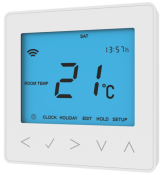
To adjust the temperature:
Select the POWER mode
Make sure the POWER option is highlighted (a rectangle ▭ will appear around it).
- If another option such as Edit or Setup is selected, use the left (<) or right (>) arrow keys to navigate until the rectangle is around POWER.

Adjust the temperature
- Use the up (⋀) or down (⋁) arrow buttons to increase or decrease the temperature as desired.
BATHROOM UNDERFLOOR HEATING
Each bathroom has its own underfloor heating. The control panel is located on the wall of each bathroom.
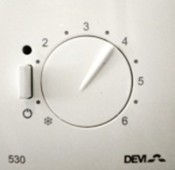
To adjust the temperature:
Simply turn the dial to set your preferred temperature.
To turn the heating on or off:
Use the power switch located on the left side of the dial.
Indicator lights:
- Red light on – The system is actively heating.
- Green light on – The system is maintaining the set temperature.
HEATED TOWEL RAILS
The ON/OFF switch is behind each towel rail / or on the wall switch panel labelled HEAT.
GAS FIREPLACES
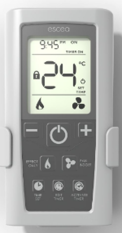
The fireplace is operated using a remote control, which can be found either on the coffee table or the bookshelf in the lounge or media room.
To use the fireplace:
- Turn on the fire
Press the POWER button in the centre of the remote.
Wait approximately 35–40 seconds for the fire to ignite.
- Adjust the temperature
Use the (–) and (+) buttons to lower or raise the temperature as needed.
- Turn off the fire
Press the POWER button again to switch off the fire.
Important Safety Information
• Do not place any items close to or against the fireplace. Keep the surrounding area clear at all times.
• If you have young children in your group, a fireguard can be requested from Reception and delivered to the property for added safety.
• Always switch off the fireplace when the property is unoccupied or the room is not in use.
KITCHEN
WASTE DISPOSAL
A waste disposal unit is built into the kitchen sink for soft food scraps and vegetable peelings.
To use:
- Place suitable scraps down the sink drain.
- Turn on the cold water tap so water is running.
- Press the button located behind the sink to start the unit.
- Press the button again to stop.
Important:
Do not place chicken, fish, or meat bones, banana skins, or any fibrous or hard food items into the disposal unit, as they may damage the system.
CERAMIC INDUCTION HOB
To operate:
- Press the POWER button (far left of the hob).
- Tap the element you wish to use (one of the four illuminated circles).
- Adjust the heat level using the 1–9 buttons.
- To turn off, press the POWER button again.
OVEN
To use:
- Turn the FUNCTION dial (right-hand side) to select a cooking mode.
- Turn the TEMPERATURE dial to your desired temperature.
- To turn off, return both dials to the Off position.
Important – Power Reset & Clock Setting:
The oven will not operate if the clock is not set (e.g. after a power cut or reset).
To set the clock:
- The display will flash 24HR.
- Use the ▶ scroll control to switch between 24HR and 12HR, then press 🗸 Select to confirm.
- Use the ◀ / ▶ controls to set the correct time.
- Press 🗸 Select again to confirm.
- The display will stop flashing once the time is set.
MICROWAVE
To use:
- Press MICRO POWER.
- Set the time using the 10 MIN / 1 MIN / 10 SEC buttons.
- Press START to begin cooking.
DISHWASHER
Dishwasher tablets are stored in the cupboard under the sink.
To run a cycle:
- The dishwasher powers on automatically when the door is opened.
- Load dishes carefully.
- Place a dishwashing tablet in the detergent dispenser.
- Use the ≫ button to scroll through wash programmes (the selected program will illuminate).
- Press ⏯ on the control panel or ⏯ on the door to start the wash.
Safety Note:
The water inside is extremely hot. Only open the door mid-cycle if absolutely necessary, and do so slowly and cautiously. The cycle will pause until the door is closed again.
EXTRACTOR FAN
The extractor fan is operated using the button panel beneath the hood.
- Press the far right button to turn on the light.
- Use settings I, II, or III to operate the fan at low, medium, or high power.
- Press the ‘O’ button (second from the right) to turn the fan off.
LAUNDRY
INSTANT HOT WATER AND COLD WATER DISPENSER
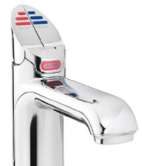
There is an instant hot water tap available in addition to the kettle. This is located to the right of the sink.
- Push or pull the leaver to dispense hot water. Please note that it may take a few seconds for the water to start dispensing.
CAUTION: Risk of scalding due to hot water. Use extreme caution when turning on the tap.
WASHING MACHINE & DRYER
The washing machine and dryer both operate in the same way:
- WASHING MACHINE ONLY – Pour the detergent in the compartment and close the drawer.
- Turn the Function Dial to your preferred programme.
- Press START/STOP to begin washing/drying your clothes.
HOME ENTERTAINMENT
TV
Available in the Lounge, Media Room & Master Bedroom
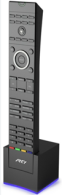
Each room is equipped with a TV and its own remote control, which sits in a charging dock nearby.
To Watch Sky TV:
- Press the SKY 1 button at the top of the remote control to turn on the TV.
- The receiver will make a soft ‘click’ as it powers on – this unit handles the TV’s audio.
- Use the CH (Channel) button or number keypad to navigate through Sky channels.
- To turn off the TV, press the POWER button.
- After use, place the remote back into its charging dock to ensure the battery remains charged.
To Watch Apple TV:
- Press the APPLE button on the remote control.
- Navigate to Settings > Users & Accounts > Add New User to sign in.
- When finished, sign out of your Apple account and turn off the TV.
IMPORTANT: Please remember to log out of all personal accounts to prevent future guests from accessing them. Millbrook is not liable for unauthorised access to your accounts if you fail to log out. If you have any concerns, we recommend refraining from using this TV feature.
OUTDOORS
SPA POOL AND OUTDOOR FIREPLACE
Please note that the spa pool and outdoor fireplace are not available for guest use. We kindly ask for your understanding and cooperation in respecting this restriction. Thank you.
AWNING
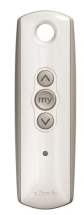
The remote control for the awning over the patio is located on the wooden side table in the far left hand corner of the lounge.
- Press the Ʌ button to open the awning.
- Press the MY button to pause/stop the awning.
- Press the V button to close the awning.
Note: Please ensure the awning is fully closed after use, especially on windy days, to prevent damage.
DUCKS
As charming as they may be, we kindly ask that guests do not feed the ducks.
Feeding them encourages them to enter the patio and house areas, where they may cause a mess.
FURTHER ASSISTANCE
If you require any assistance during your stay at Millbrook, please don’t hesitate to contact Reception on ext. 0.
Once again, we hope you have a wonderful and relaxing stay.