Welcome to Millbrook Resort and 20 Ayrburn Ridge
For your convenience please find below the Property Manual for your Resort Home and important guest information on the House Rules.
We hope that you have a wonderful stay with us.
Important Guest Information, House Rules
The Resort Homes are private residences managed by Millbrook Resort, we kindly ask that all guests staying within this accommodation type respects our property owners by complying with the following requests:
-
Please remove any soiled footwear before entering the property.
-
Any spillages on soft furnishings should be reported to Reception so our housekeeping team can attend to them promptly. To avoid further damage, please do not attempt to remove stains on upholstery.
-
Most wall heating thermostats have been pre-programmed (basic instructions for increasing/decreasing heat are in the online Property Manual). If you are unsure how to adjust the settings, please contact Reception so a staff member can assist you.
Thank you and we hope that you have an enjoyable stay.
20 Ayrburn Ridge Property Manual
All of our Resort Homes and Luxury Retreat properties have been specifically tailored and designed to the requirements of individual owners, making your stay a unique experience. Within this manual we have included some information specific to this property relating to the operation of various components found within the house. We would like to remind you that this is a residential area with neighbouring properties and we ask that noise levels are kept to a minimum. Should any accidental damage occur, please inform a member of staff immediately to avoid any additional charges being incurred. Thank you for your care and consideration.
PHONES
There are two phones; one in the dining area and one in the master bedroom. The phones are linked to the Millbrook Hotel system.
- The extension for this property is 5620
- For Reception - dial 0
- For an outside line – dial 1. Calls will be charged to your account.
- For other internal numbers, such as restaurants and the Spa, please refer to the instructions on the phone, or the Millbrook Compendium here.
PRIVATE STORAGE
The owner has various cupboards and/or rooms around the property locked for private storage.
RUBBISH
There are two small rubbish bins located in a drawer to the left of the kitchen sink. There are also larger rubbish bins located in front of the garage.
BLUE BIN: Bottles and glass jars only (no lids) and no broken glass.
YELLOW BIN: Mixed recyclables such as cardboard, paper and plastics (1,2 & 5).
RED BIN: General waste.
NOISE LEVELS
We would like to remind you that this is a residential area with neighbouring properties and we ask that noise levels are kept to a minimum.
SPILLS & ACCIDENTAL DAMAGE
Please do not attempt to remove stains on upholstery and soft furnishings.
Any spillages on upholstery and soft furnishings should be reported to Reception so our housekeeping team can attend to them promptly to avoid further damage.
If an accident occurs causing damage of any kind, please report it to Reception immediately so the issue can be resolved promptly by the Maintenance Department and/or Property Manager.
FIRE & EMERGENCY
EVACUATION
An EVACUATION NOTICE is displayed by the entrance door. Please refer to this for evacuation instructions.
TORCH
In the event of a power cut, a torch has been provided for your convenience. This is located in the cupboard to the right of the dishwasher.
FIRE EXTINGUISHER
A small fire extinguisher can be found in the cupboard, to the right of the dishwasher.
- Pull the pin on the extinguisher.
- Aim the nozzle toward the base of the fire.
- Squeeze the handle to release the extinguisher agent.
- Sweep from side to side until the flames are extinguished.
If the extinguisher is emptied and the fire is still not out, evacuate the property immediately.
HEATING AND COOLING
During the colder seasons, heating will be pre-set for your comfort. Generally, in the warmer months heating is turned off.
To turn ON/OFF, or increase or decrease the temperature for the various heating options, please refer to the instructions below.
HEAT PUMP & AIR CONDITIONING (LOUNGE & KITCHEN)
The panel for this can be found on the wall between the kitchen cupboards, and the fireplace. Should you wish to change the temperature, change the mode, or switch off, please follow the instructions below:
- Press START/STOP to turn On or OFF.
- Press MODE to change the operation.
- - Press the ⋀⋁ buttons to increase or decrease the temperature.

RADIATORS
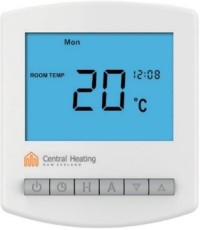
The heating is provided by wall radiators in most rooms which need to be turned on using the dial on the side of each one, The thermostat is located on the wall in the Master Bedroom. It is set to target temperature and once reached, the radiators will not heat up anymore. The controls should not need adjusting, however the temperature can be chnaged as follows:
- If the thermostat is not already on, select
 . A flame symbol will appear if the set temperature is higher than the room temperature. Once the room temperature reaches the set temperature, it will go into standby mode until the temperature drops again.
- To adjust the set temperature use
 and
and  , then press A to confirm.
- To turn off the thermostat, select
 again and a
  symbol will appear on the screen.
IMPORTANT: Please do no place anything up against heaters or use them as drying appliances.
UNDER-FLOOR HEATING (BATHROOMS & LAUNDRY)
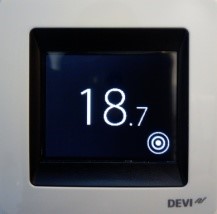
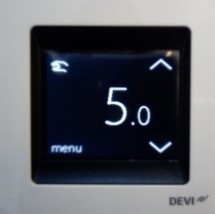
Heating is controlled separately in each bathroom. The controls should not need adjusting; however, you can change the temperature by selecting  and then adjusting the temperature using the ꓥ & ꓦ keys.
HEATED TOWEL RAILS
The ON/OFF switch is behind each towel rail / or on the wall switch panel labelled HEAT.
GAS FIREPLACE (LOUNGE)
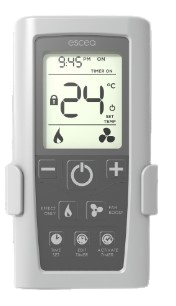
The fireplace is controlled by a remote which can be found on the mantel piece.
- Push the POWER button in the centre of the remote and wait for approximately 35-40 seconds for the fire to ignite.
- Use the – and + buttons to control the temperature.
- Turn off the fire by pushing the POWER button again.
IMPORTANT: Never place items close to or up against the fireplace. If you have young children in your group, a fireguard can be requested from Reception to be delivered to the property. Always switch off the fireplace when the property is vacant.
KITCHEN
CERAMIC INDUCTION HOB
- Press the POWER button on the far left of the hob.
- Choose the element you wish to use by pressing one of the four illuminated circles on the hob.
- Adjust the level of heat by pushing one of the buttons from 1 to 9.
- Turn off the hob by pressing the POWER button again.
OVEN
- Turn the dial on the left to set the cooking function, i.e. back (heating top/bottom), fan grill, etc.
- Turn the dial on the right to control the temperature.
- To set the cooking time, press the
 button twice – 00:00 will be displayed so use the + and – buttons to set a later end time. A signal will sound with then cooking time has elapsed.
NB: The oven won’t function if the clock is not set. After an electrical blackout the time will flash and the clock will need to be reset. Press the button (the time 12:00 will be displayed). Set the time using the + and – buttons. After a few seconds the time will be adopted.
COMBI OVEN & MICROWAVE
- Turn the dial on the left to MICROWAVE.
- Select the 360, 600 or 900 button to choose your desired power level.
- To set the cooking time, press the button and use the + and – buttons to set your time.
- Press the START-PAUSE button to begin the process.
NB: The oven won’t function if the clock is not set. After an electrical blackout the time will flash and the clock will need to be reset. Press the button (the time 12:00 will be displayed). Set the time using the + and – buttons. After a few seconds the time will be adopted.
WARMING DRAWER
- Place the ovenware in the drawer.
- Set the function selector inside to setting 3 and preheat the appliance for 10 minutes.
- Add the food to the preheated ovenware.
- Close the drawer again. The POWER ON indicator will light up and the appliance will heat up.
- Please turn off the warming drawer after use.
DISHWASHER
- The dishwasher will automatically turn on when you open the door.
- Carefully load the dishwasher.
- Place the dishwashing tablet inside the detergent dispenser (on the left side, on the inside of the door and rinse aid in the dispenser on the right side of the door).
- Choose the desired setting using the PROG button.
- Press START/STOP and close the door to start the wash cycle.
N.B If you do not wish to start a cycle, press and hold the POWER button until the dishwasher turns off, close the door.
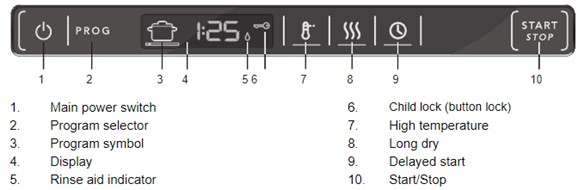
Important: Water in the dishwasher will be scalding hot so it is not recommended to open the door while the dishwasher is in use unless absolutely necessary. If this is the case, open the door slowly and with extreme caution – the cycle will cease until you close the door again.
WASTE DISPOSAL
There is a waste disposal unit located in your kitchen sink where you can dispose of soft food scraps and vegetable peel. Place the items you want to dispose of down the drain, turn on the cold water tap so water is running down the drain and press the button located behind the sink to start the grinding. Press the button again to stop the unit. Please do not place chicken, fish or meat bones, banana skins (or any fibrous or hard foods) in the unit.
HOME ENTERTAINMENT
IMPORTANT!
You may log into your personal streaming accounts such as Netflix, Neon etc on TVs that have this ability. However, Millbrook will not be liable for any other parties accessing your Streaming service accounts. Please ensure you log out at the end of each session.
TV LOUNGE, MEDIA ROOM AND MASTER BEDROOM
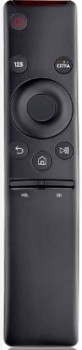
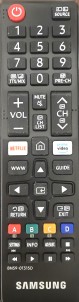
- To turn on the TV press the POWER button on the Samsung remote control.
- To change the channel, either move the CH button up or down, or press the ‘123’ button to type in a channel.
- To change the volume, move the VOL button up or down.
- To use streaming service apps, press the 🏠 button, then use the circular directional pad and middle select button to scroll through and select an app. Log in with your personal account details. Ensure to log back out of each app once finished.
- To turn off the TV press the POWER button on the remote again.
TV GUEST BEDROOM (Panasonic)
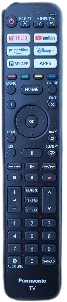
- Use the Panasonic Remote to turn the TV ON/OFF and adjust the volume.
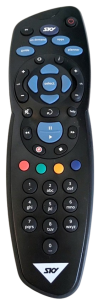
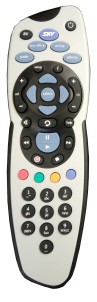
- Use the Sky remote to change channels.
- To use streaming service apps, press the corresponding App button on the remote (Netflix, YouTube, Prime Video, Disney+) OR press the APPS button to view all apps.
- Log in to the available app with your personal account details. Sign-out of the app when finished.
- To return to Sky TV, press AV on the Panasonic remote, and select HDMI1.
TV TWIN BEDROOM (Samsung)
- Use the Samsung remote to turn the TV ON/OFF and adjust the volume.
- Use the Sky remote to change channels.
- To use streaming service apps, press the SMART HUB button on the Samsung remote, and log in to the available apps with your personal account details. Sign-out of the app when finished.
- To return to Sky Tv, press the SOURCE button, and select SKY.
AUDIO SYSTEM
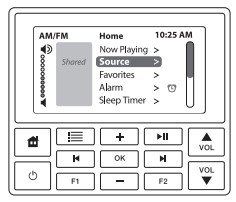
There are ceiling speakers in each room of the house, including the patio area. The panel for each room is located on the wall. To operate:
- Press the button on the keypad to turn ON/OFF.
- Press the Volume up/down buttons on the side on keypad.
- Press
 to go to the main menu.
- From the main menu, use the + or – buttons to scroll to SOURCE and press OK.
- Use the + or – buttons to make a selection for listening to: Radio, TV Audio, Sonos.
- To use Sonos, you must have the App available on your phone, and be connected to the Ayrburn20 Wifi.
IMPORTANT
- We kindly ask guests to refrain from using the speakers in the outdoor patio area out of courtesy to neighbouring properties.
- The speaker system has been pre-programmed. Do not attempt to adjust or change any settings.
OUTDOORS
AWNING
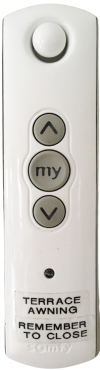
The control for the awning over the patio is located on the fire mantlepiece.
- Press the Ʌ button to open up the awning, the MY button to pause the process and the V button to close the awning.
NB: Please ensure the awning is closed after use and also on very windy days.
BBQ
- Make sure the lid on the BBQ is open before igniting the burners.
- To light the burner, depress the dial and rotate it too high.
- Hold for 5 seconds, release and check the flame.
- If the burner does not light, turn dial to the OFF position. Allow gas to disperse, then repeat lighting procedure.
NOTE: When finished, please ensure the burners are completely off before closing the lid and walking away.
GAS FIREPLACE
- Remove the metal lid before igniting.
- Turn on the switch on the right side of the fireplace.
- If it doesn’t ignite immediately, try again.
- When finishing using, please place the metal lid back on.
DUCKS
We kindly ask guests NOT to encourage the ducks onto the property by feeding them, as they will leave a mess on the patio and inside the house.
FURTHER INFORMATION
Should you require further assistance during your stay here at Millbrook, please contact Reception on ext 0.
Once again, we hope you enjoy your stay.